0x00 瞎扯淡
一个偶然的机会,需要读取Android平台下微信数据库中的内容,此时此刻才发现,Android是多么的强大!!!于是便开始搜索,果不其然,高手在民间啊,大天朝果然奇才汇聚,晚上已经有大牛分析很彻底了,我这不过也是写写自己的总结。原文传送门http://blog.csdn.net/yuanbohx/article/details/41674949。越来越想入安卓坑了…:)
0x01 准备工作
- 首先第一步,手机需要获取root权限,并安装RE管理器。
- 然后进入手机中
/data/data/com.tencent.mm/MicroMsg目录下,使用RE自带的压缩功能将整个目录都压缩下来,压缩后压缩包将保存在/storage/emulated/0/SpeedSoftware/Archives/目录下。 - 此时需要使用电脑将压缩包传到电脑,命令是
adb push /storage/emulated/0/SpeedSoftware/Archives/MicroMsg.zip d:/,这是将压缩包上传到电脑中D盘根目录下,成功后在电脑中就可以看到上传的压缩包,然后解压。解压后会发现一个甚至多个很长数字串组成的目录,那个就代表所有在本机上登录过账号的信息,每个目录中EnMicroMsg.db就保存着该账号的所有信息。 - 最后就是下载数据库查看工具sqlcipher.exe,可以查看加密数据库。但此时查看EnMicroMsg.db会提示需要密码,这就需要我们计算出密码。准备工作到此就结束了。
0x02 计算数据库密码
根据上面博客中我们知道,数据库的密码是MD5(手机IMEI + 微信uin)的前7位,当然博客中的方法也是可行的,但是稍微麻烦一点,有位不知名大神发明了一种更简单一点的方法,直接可以全部使用代码计算出密码,而不用那么麻烦,代码如下。
1
2
3
4
5
6
7
8
9
10
11
12
13
14
15
16
17
18
19
20
21
22
23
24
25
26
27
28
29
30
31
32
33
34
35
36
37
38
39
40
41
42
43
44
45
46
47
48
49
50
51
52
53
54
55
56
57
58
59
60
// MD5加密

public static String encodeMD5(String plainText) throws NoSuchAlgorithmException{
    try {
	    MessageDigest md = MessageDigest.getInstance("MD5");
	    md.update(plainText.getBytes());
	    byte b[] = md.digest();

	    int i;

	    StringBuffer buf = new StringBuffer("");
	    for (int offset = 0; offset < b.length; offset++) {
	        i = b[offset];
	        if (i < 0)
	            i += 256;
	        if (i < 16)
	            buf.append("0");
	        buf.append(Integer.toHexString(i));
	    }
	    return buf.toString();//.substring(8, 24);// 16位的加密

	} catch (NoSuchAlgorithmException e) {
		  // TODO Auto-generated catch block

		e.printStackTrace();
		return "";
	}
}

// 导出的MicroMsg路径

public static String MicroMsgPath = "C:/Users/Administrator/Desktop/MicroMsg";

public static String getKey(){
     String key = "";
      try {
           ObjectInputStream in = new ObjectInputStream(new FileInputStream(MicroMsgPath+"/systemInfo.cfg"));
           Object DL = in.readObject();
           HashMap hashWithOutFormat = (HashMap)DL;
           ObjectInputStream in1 = new ObjectInputStream(new FileInputStream(MicroMsgPath+"/CompatibleInfo.cfg"));
           Object DJ = in1.readObject();
           HashMap hashWithOutFormat1 = (HashMap)DJ;
           String imei = String.valueOf(hashWithOutFormat1.get(Integer.valueOf(258))); //取IMEI

           System.out.println("读取IMEI:"+imei);
           Object uin = hashWithOutFormat.get(Integer.valueOf(1));
           System.out.println("读取UIN:"+uin);
           if(uin.toString().length()<4)
	           return "0000000";
           String s=imei+uin;//

           s=encodeMD5(s);//hash

           key = s.substring(0,7);
           System.out.println("计算数据库密码为:"+key);
           System.out.println("The Key is : "+key);
           String dir = encodeMD5(key+uin);
           System.out.println("The Dir is : "+dir);
           in.close();
           in1.close();

           return key;
      }catch(Exception e){
	       return key;
      }
}
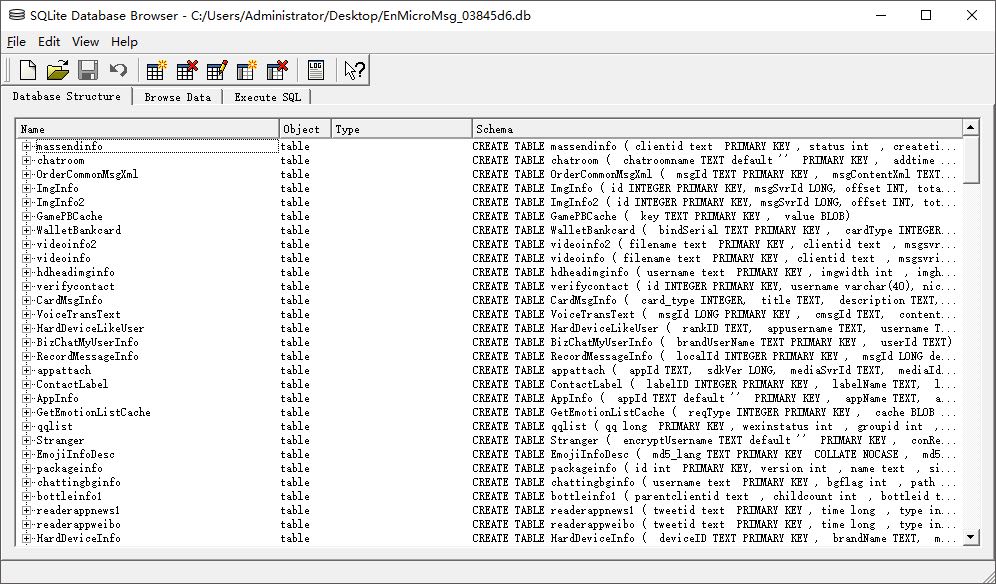
只需要修改导入目录的路径就可以使用getkey返回数据库的密码。最终读取的数据库内容如下图。